Replay real markets. One strategy at a time.
Load a market, press play, and trade the chart candle by candle as if it were live, with the order flow underneath: volume footprint, volume bubbles and a liquidity heatmap. Then review every decision in the journal and stats. Crypto, forex, stocks, indices, metals and options from M1 to D1, or your own CSV.
- $1 for 7 days
- Free via a partner signup
- $25 / month
- $289 / year
Two-minute registration · no card to register
Don't just see where price went. See who moved it.
Most backtesters stop at candles. Backtester Pro shows the volume and liquidity behind them, so you can test order-flow setups the way you would trade them.
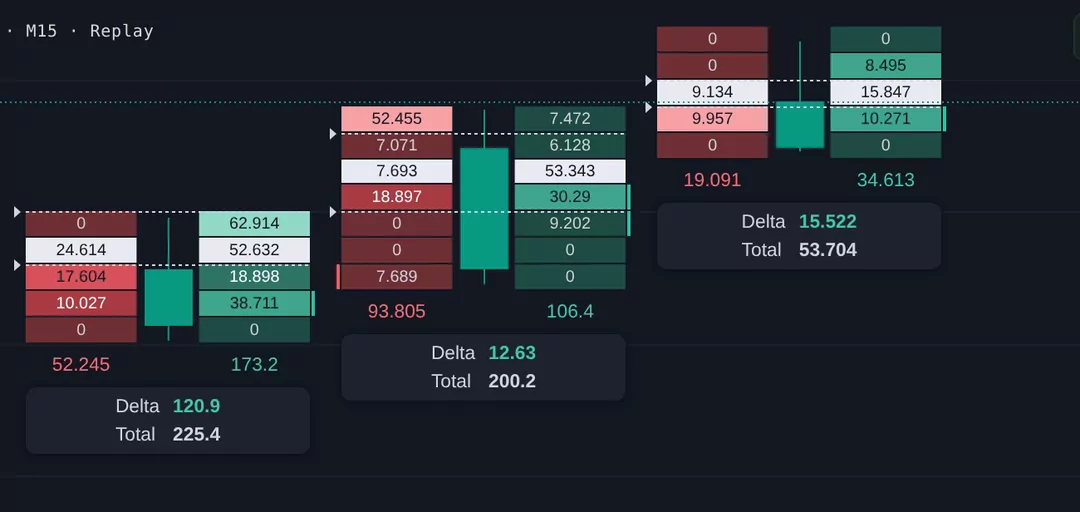
See what traded inside every bar
Bid × ask volume at each price, with delta and total under every candle. Spot absorption, imbalances and exhaustion that a plain candle hides.
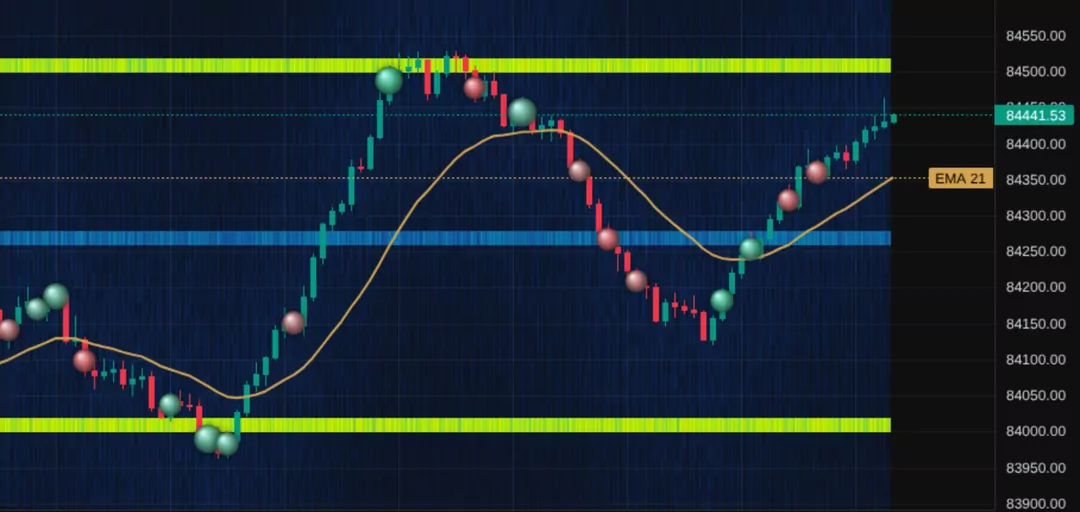
Where the resting orders sit
Order-book depth drawn behind price over time. Bright bands are big resting limit orders: walls price reacts to, and walls that get pulled.
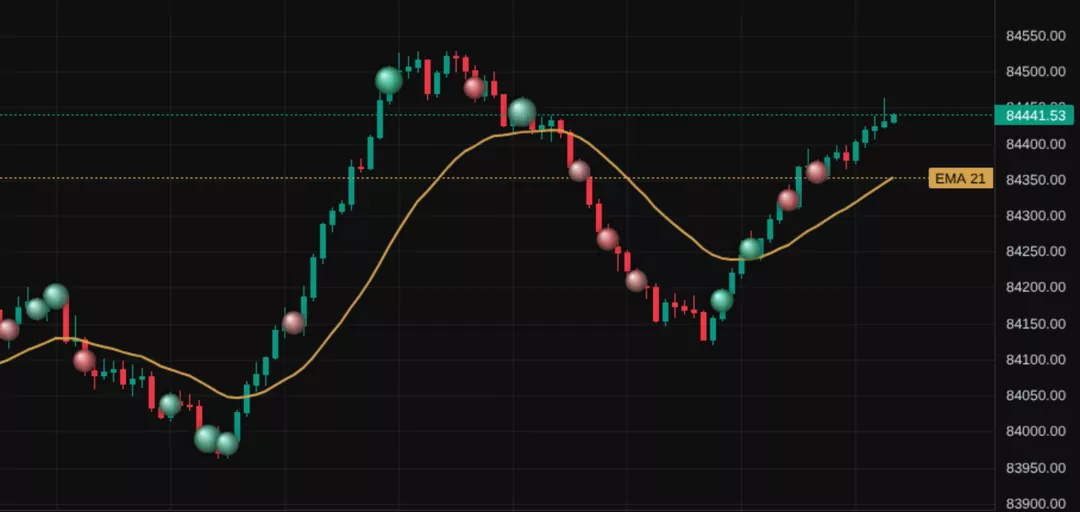
Who hit the market, and how hard
Aggressive buying (green) and selling (red) marked on the chart, sized by how unusual the volume is. Filter to only the biggest prints.
Live crypto uses exact taker buy/sell data from Binance. The liquidity heatmap is recorded from the order book while you forward-test crypto and replays in your backtests. Other markets estimate buy/sell volume from each candle.
Everything a backtester should be. Nothing it shouldn't.
Backtest or forward-test
Replay history bar by bar at up to 10× speed, or paper-trade the live market. Sessions save themselves: stop halfway and pick up exactly where you left off.
Every market, M1 to D1
Crypto, forex, stocks, indices, metals and options from 1-minute to daily, or upload your own CSV. Forex days roll at 17:00 New York, like your broker.
34 TradingView-style drawing tools
Fibonacci, pitchforks, Gann, regression channels, long and short position tools and more, with undo and redo, and every drawing saved with its session.
Fills that behave like a broker
Market, limit and stop orders with stop loss, take profit, partial closes, breakeven and trailing stops. Spread is modelled, and P&L is in your account currency.
Performance you can trust
Win rate, expectancy in R and in money, profit factor, max drawdown, Sharpe, Sortino and an equity curve, plus a full trade history you can export to CSV.
Script Lab: JavaScript or Python
Write a strategy in code and backtest it over the same data, with its trades and plots drawn on your chart. Switch timeframe and it re-runs.
News and the economic calendar
High-impact events and market headlines are marked on the chart, so you can see what moved price and practise trading around the release.
A notebook for your rules
Keep your strategy rules and trade notes next to the chart. Type, or write and sketch with Apple Pencil or any stylus.
Desktop, tablet or phone
It runs in the browser, with layouts made for tablets and phones. Back up your sessions, journal, drawings and notes to a file whenever you like.
Backtest it — then check the math.
Most backtesters stop at a list of trades. TradeOnMath is built around what those trades imply, and the calculators that answer it are free.
- 01 · Replay
Trade the past as if it were live
Pick a market and timeframe, press play, and take your setups as the candles print — step, pause and change speed as you go.
- 02 · Review
Read the numbers you actually made
Go through the trades in the journal and stats tabs, so your win rate and average win and loss come from real decisions, not memory.
- 03 · Stress-test
See what those numbers imply
Run them through Strategy Reality Check (10,000 randomized futures of your edge) or Pass Probability (your odds on a prop-firm challenge). Both free.
Start with a trial, go monthly or yearly — or get it free through a partner.
Pick a plan and register — no card needed to register. Partner signups get it free; paid plans pay on a secure checkout right after registering and get the license key on screen.
Signed up to a broker or prop firm through TradeOnMath? The backtester is on the house.
- Full backtest + forward-live modes
- All asset classes, all timeframes
- Issued after we verify your signup
Put it through its paces on real data for a week before you commit. Same product as the paid plans.
- Full access for 7 days
- No auto-renew
- Secure Razorpay checkout right after registering
Ongoing access to the hosted backtester — strategies, replays and your journal across sessions.
- Full access every month
- Every future update included
- Renews monthly — auto-renew can be switched off
- Secure Razorpay checkout right after registering
A full year of access for less than twelve months of the monthly plan.
- Full access for 12 months
- Every future update included
- Renews yearly — auto-renew can be switched off
- Secure Razorpay checkout right after registering
The price shown is the price you pay — no tax is added at checkout. Payments are non-refundable once confirmed, so the 7-day trial is there to try it first.
- 01 Register
- 02 Pay at checkout (or we verify your partner signup)
- 03 License key on screen (partners: by email)
- 04 Activate it at /backtester/login/
Straight answers.
Do I need to register?
Yes. Every copy of the backtester is issued to a registered trader, and a license key only unlocks for the email address it was registered with. Registration takes two minutes at /backtester/register/ and needs no card.
How do I get access after I register?
For a paid plan (trial, monthly or yearly), the registration form hands you straight to Razorpay's secure checkout (card, UPI or netbanking), and your license key appears on screen the moment the payment is confirmed. For partner (free) access, we verify your signup in the partner's affiliate dashboard, then email you the key. Either way: go to /backtester/login/, enter the key + your email, and the backtester opens.
How do I use the license key?
Open /backtester/login/ (the payment screen links straight there with the key filled in). Enter the key (format: TOMBT-XXXXX-XXXXX-XXXXX) and the email address you registered with. We check both and open the backtester, where the key activates on your account. After that you just log in: "Log in" at the top of every page takes you there.
Which partners count for the free partner plan?
Anyone who signed up to a broker or prop firm via a TradeOnMath /go/ redirect link. FTMO, FundedNext, E8 Markets, The Funded Trader, Topstep — if you clicked through us and opened an account, you qualify. Pick the partner from the dropdown when you register.
Is the trial auto-renewing?
No. It's a one-off payment for 7 days — payment happens on our payment gateway, we don't hold your card. When the 7 days end, the key expires. If you want ongoing access, register for the monthly or yearly plan.
Do the monthly and yearly plans renew automatically?
Yes, by default: they renew at the end of each month or year until you turn auto-renew off. You can untick auto-renew when you register to pay for a single month or year, or turn it off later by contacting us. Either way you keep access until the end of the period you've paid for. The 7-day trial never renews.
Can I get a refund?
No — payments are non-refundable once confirmed, which is why there's a low-cost 7-day trial to try the backtester first. If you're charged twice by mistake, or we can't deliver a working license key for a payment, contact us and we refund that payment.
Why are prices shown in rupees for me?
Visitors in India are priced in INR: ₹99 for the 7-day trial, ₹2,500 a month or ₹28,999 a year. Everywhere else it's $1, $25 a month or $289 a year. We use your connection's country to pick the currency, and the same applies at checkout. The price shown is the full amount — nothing is added at checkout.
How do I log in again later?
Click "Log in" at the top of any page (or go to /backtester/login/) and sign in to the backtester with the email you registered with. Entering your key again there is fine too: repeat activations of a valid key don't use it up. You only lose access if the key expires or is revoked.
What historical data is included?
Built-in feeds cover the common majors and top crypto pairs at M1 to D1 timeframes. For anything more niche — an exotic pair, a specific broker's spread, or a session-filtered dataset — upload your own CSV.